What Is an IT Asset Audit?
Learn how to conduct a successful IT asset audit, including audit types, key metrics, and tips for avoiding common mistakes.
What Is an IT Asset Audit?
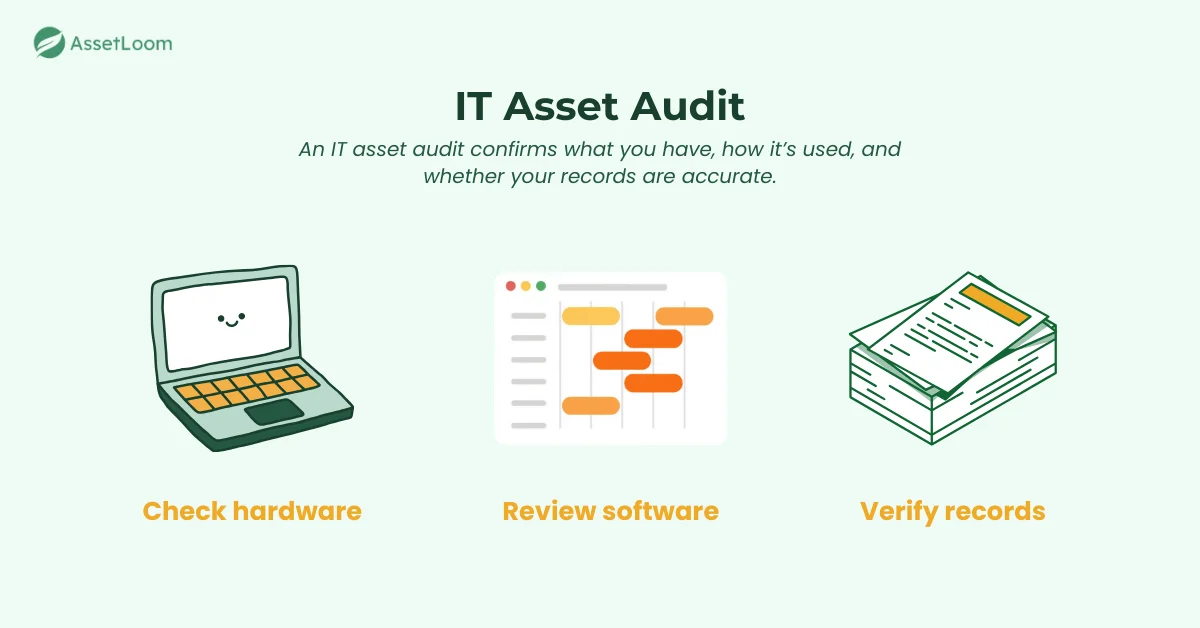
An IT asset audit is a detailed review of all the technology your company uses, both hardware and software. It involves verifying the current status of each asset, such as checking if computers, servers, and software licenses are still in use, properly functioning, and accounted for.
The purpose is to ensure your asset records are accurate, help track the lifecycle of each item, and confirm compliance with legal or internal policies. This audit is also an important part of good IT asset management (ITAM), since it keeps your asset data reliable and up to date.
In short, an IT asset audit is like taking a snapshot of your company’s technology to ensure everything is where it should be, working as it should, and properly documented.
Why Conduct an IT Asset Audit?
An IT asset audit is essential for keeping your organization organized, secure, and efficient. Here are the main reasons to conduct one:
- Ensure Compliance: Verifies that all assets, especially software, are licensed and meet legal and regulatory standards, avoiding fines or legal issues.
- Optimize Asset Utilization: Identifies underused or misplaced assets, helping eliminate waste and redirect resources more effectively.
- Mitigate Risks: Helps identify outdated or unsecured assets that could pose security risks, allowing for proactive fixes.
- Improve Budgeting and Planning: Provides insight into asset lifecycles, helping with cost planning for replacements or upgrades.
- Increase Operational Efficiency: Streamlines asset management, reducing downtime and ensuring employees have the tools they need.
By understanding these key benefits, it becomes clear why conducting regular IT asset audits is crucial. Next, let’s look at the different types of IT asset audits and how to choose the right one for your organization.
Types of IT Asset Audits
There are different types of IT asset audits depending on the scope and focus of your audit. Understanding these types can help you determine which one is right for your organization’s needs. Here are the main types of IT asset audits:
- Physical Asset Audit: Focuses on verifying the physical hardware your organization owns, such as computers, servers, and networking equipment. It involves checking serial numbers, asset tags, and the condition of each item to ensure they match your inventory records.
- Software Asset Audit: Aimed at ensuring that all installed software is properly licensed and compliant with vendor agreements. It helps identify any unlicensed or outdated software, reducing the risk of fines for non-compliance.
- Network Asset Audit: Examines network devices and infrastructure, such as routers, switches, firewalls, and servers. This audit ensures that network assets are properly configured, secure, and updated to prevent performance issues or security vulnerabilities.
- Cloud Asset Audit: Focuses on virtual and cloud-based assets, including servers, storage, and cloud services (e.g., AWS, Azure). This audit ensures that cloud resources are properly allocated, used efficiently, and compliant with security standards.
- Compliance Audit: Verifies that your assets meet specific industry or regulatory standards, such as GDPR, HIPAA, or software license agreements. This audit helps ensure your organization avoids penalties for non-compliance.
Each type of audit has its unique focus, and depending on your organization’s goals, you may need to perform one or more of these audits. In the next section, we’ll explore the key metrics you should use during an IT asset audit to evaluate its success.
Key Metrics to Use in IT Asset Audits
When conducting an IT asset audit, tracking the right metrics is essential to evaluate the success and effectiveness of the audit. These metrics give you insight into asset utilization, compliance, and overall asset performance. Here are the key metrics you should focus on:
- Asset Utilization Rate: This metric measures how often each asset is being used. Low utilization rates may indicate underused equipment or software, which could be eliminated or repurposed to optimize costs.
- Compliance Rate: Tracks the percentage of assets that are compliant with software licensing agreements, security standards, and legal regulations. A high compliance rate reduces the risk of fines or legal issues.
- Audit Accuracy: Measures the accuracy of your audit by comparing actual assets to digital records. A high audit accuracy means your inventory system is well-maintained and reliable, while discrepancies suggest areas for improvement.
- Cost per Asset: This metric helps track the costs associated with each asset, including purchase price, maintenance, and any operational costs. It’s useful for identifying expensive or underperforming assets that may need to be replaced or optimized.
- Lifecycle Stage Distribution: Tracks where assets are in their lifecycle (e.g., acquisition, in-use, retired). Knowing this helps with budgeting for replacements and identifying assets that are nearing the end of their useful life.
- Missing Assets Rate: This metric shows the percentage of assets that are unaccounted for during the audit. A high missing assets rate can signal issues with asset tracking or security.
By monitoring these key metrics, you can ensure your IT asset audit provides valuable insights and helps improve asset management practices. Next, we’ll explore how to conduct an IT asset audit with a step-by-step guide to ensure you get the best results.
Step-by-Step Guide to Conducting an IT Asset Audit
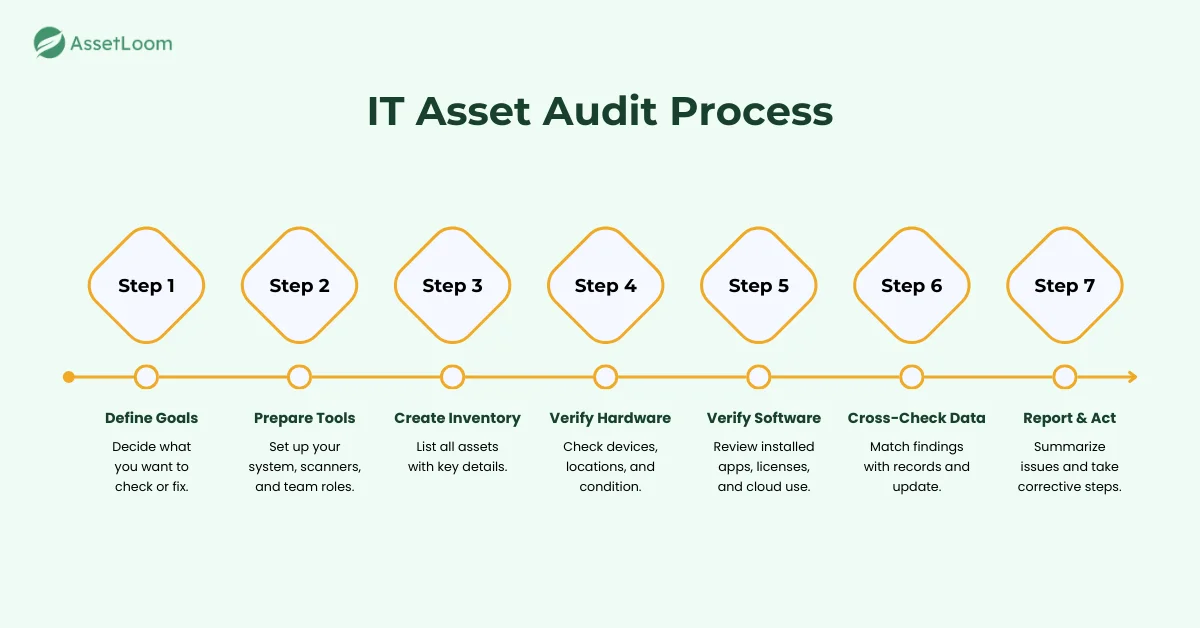
If you’re new to IT asset audits, the process can feel overwhelming at the start. Breaking it into clear steps helps you move through it with confidence and stay organized from beginning to end. Here’s a simple guide to walk you through the full audit process.
Step 1: Define Your Audit Goals
Start by deciding what you want to accomplish. Some audits focus on software compliance, others aim to verify hardware records, and some are meant to clean up old data. Trying to check everything at once can make the process confusing.
Ask yourself questions like:
- Are we trying to update outdated records?
- Do we want to confirm software license compliance?
- Are we trying to find missing or unused devices?
Clear goals help you stay focused and make the audit easier to complete.
Step 2: Prepare Your Tools and Resources
Once you set your goals, gather the tools you will need. You need a reliable place to record data, such as an IT asset management system or a spreadsheet if you are just starting. If you plan to audit physical devices, get barcode scanners, RFID readers, or a mobile device with a scanning app.
It also helps to assign roles early. Decide who will check physical hardware, who will verify software data, and who will update the records. A prepared team shortens the audit time and reduces mistakes.
Step 3: Create or Update Your Asset Inventory
Before you verify anything in person, make sure your asset list is complete. This becomes your baseline for the entire audit.
Your inventory should include:
- Asset name and type
- Model and serial number
- Assigned user or department
- Location
- Purchase date and condition
- Software tied to the device
A clear and organized inventory saves time and avoids confusion later.
Step 4: Perform Physical Asset Verification
Now it is time to check the hardware in person. This confirms what you actually have, not just what is recorded. Walk through departments, scan asset tags, and speak with users when needed.
During this step:
- Confirm each asset exists and matches your records
- Note devices that are broken, missing, or no longer used
- Check if assets are in the correct location or assigned to the right person
This is often when missing laptops, unused equipment, or unrecorded devices are discovered.
Step 5: Verify Digital Asset Information
Physical assets are only part of the audit. Software and cloud tools also need reviewing. This step helps you catch licensing issues, outdated versions, and unused subscriptions.
Focus on:
- Installed applications vs purchased licenses
- User counts for SaaS tools
- Cloud servers, storage, and virtual machines
- Software versions that need updates
This often reveals unused tools you are still paying for or outdated software that poses security risks.
Step 6: Cross-Reference All Data
After collecting physical and digital information, compare it with your inventory. This is where mismatches become clear. Many organizations find records that have not been updated for years.
Common issues include:
- Devices in the wrong location
- Software installed on unapproved machines
- Assets are listed as active even though they are retired
- Unrecorded devices that appear during scanning
Update everything so your records reflect the current state. Accurate records help both daily operations and future audits.
Step 7: Report Findings and Take Action
Create a clear report that summarizes what you found. This helps leaders understand the condition of your IT environment and supports decisions about budget and security.
Include details such as:
- Missing or unaccounted assets
- Unlicensed or unused software
- Devices near the end of life
- Security or compliance concerns
- Recommended next steps
Once the report is shared, start addressing the issues. Retire old equipment, purchase needed licenses, fix inaccurate records, or update asset management procedures as needed.
A structured audit gives you a reliable view of your entire IT environment. With accurate data in place, managing your assets becomes easier, and future audits become faster. Next, we will look at the core knowledge you should understand to run an audit with confidence.
Core Knowledge for a Successful IT Asset Audit
A smooth and accurate audit doesn’t depend only on the steps you follow. It also relies on understanding a few key concepts that guide how you collect, verify, and manage asset information. Having this foundation makes the entire process easier and helps you make better decisions.
Understanding Asset Categories
Before you begin an audit, it helps to know the types of assets you are dealing with. Each category has different requirements and risks.
- Hardware: Includes laptops, desktops, servers, monitors, mobile devices, and networking equipment. These assets often require physical verification.
- Software: Includes operating systems, licensed applications, and SaaS tools. Software checks usually focus on license validity, usage, and compliance.
- Network Resources: Includes routers, switches, access points, and firewalls. These assets also need configuration checks to ensure they are secure and updated.
- Cloud Assets: Includes virtual machines, cloud servers, databases, and online storage. Cloud audits involve checking usage, subscriptions, and access controls.
Understanding these categories helps you decide how deep your audit needs to go and where you may need extra tools or support.
Importance of Asset Tagging
Asset tagging is one of the most important elements of a successful audit. A simple tag or barcode can save hours of work later.
Tagging is helpful because it:
- Makes it easy to identify assets during physical checks
- Reduces human error during data entry
- Helps track movement between departments
- Supports faster audits in the future
If your organization doesn’t already use asset tags, starting this process during the audit is a smart move.
Compliance and Licensing Basics
Software compliance is often the area with the highest risk. Understanding the basics helps you avoid unexpected fines or security issues.
Key things to know include:
- License types and limits
- How many installations you have versus how many licenses you purchased
- Renewal dates and subscription details
- Whether any software is outdated or not approved for use
Keeping this knowledge in mind helps you spot problems early and keep your software environment clean and compliant.
Tools That Make Audits Easier
You can perform an audit manually, but using tools makes the work faster and more accurate. Even basic tools can significantly improve results.
Common audit tools include:
- Asset management platforms that track all hardware and software
- Scanning tools like barcode or RFID readers
- Software discovery tools that detect installed applications
- Cloud dashboards for monitoring virtual machines and subscriptions
Using the right tools helps reduce errors and makes your audit more reliable.
A good understanding of these areas lays the groundwork for a smooth audit process. Now that you know what knowledge you need, let’s look at common mistakes teams make during IT asset audits and how to avoid them.
Common Mistakes in IT Asset Audits and How to Avoid Them
IT asset audits can run into problems that slow down the process or create inaccurate results. Knowing these common mistakes helps you avoid them and keeps your audit running smoothly.
- Starting with no plan: Beginning the audit without clear goals or a defined scope leads to confusion. Set simple objectives to stay focused.
- Using outdated inventory records: Old or incorrect data makes it harder to confirm what is truly missing or inaccurate. Clean up your asset list before you start.
- Overlooking software compliance: Checking hardware only can cause unlicensed or unused software to go unnoticed. Compare installed apps with your license records.
- Skipping physical verification: Relying only on digital records can hide missing or misplaced devices. A quick walk-through helps confirm what actually exists.
- Ignoring discrepancies: When records don’t match what you find, the issue should be addressed right away. Update details or investigate missing items.
- Underestimating time and effort: Audits often take longer than expected. Plan enough time and use tools to speed up data collection.
By avoiding these mistakes, your audit becomes easier to manage and produces results you can trust.
Glossary of Related Terms
Frequently Asked Questions (FAQs)
How often should an IT asset audit be done?
Most organizations run a full audit once a year. Larger or high-risk environments may benefit from doing audits more often.
What should I do if assets are missing during the audit?
Check with the assigned user or department first. If the asset cannot be found, update your records and review your tracking process to help prevent similar issues.
Can an IT asset audit be automated?
Yes. Audit tools can detect devices on your network, collect software details, and update records automatically, reducing manual work.
How do I confirm software license compliance?
Compare installed applications with the number of licenses your organization owns. A software discovery tool makes this easier and more accurate.
How long does an IT asset audit take?
The time varies based on the number of assets and how organized your records are. Small audits may take a few days, while large environments can take several weeks.
What tools are most helpful for an audit?
Asset management platforms, barcode or RFID scanners, and software discovery tools are the most common solutions. Even simple tools can help speed up the audit.