What Is a Barcode in IT Asset Management?
Learn what a barcode means in IT asset management, how it works, the types used in ITAM, and why it helps improve tracking and accuracy.
What Is a Barcode?
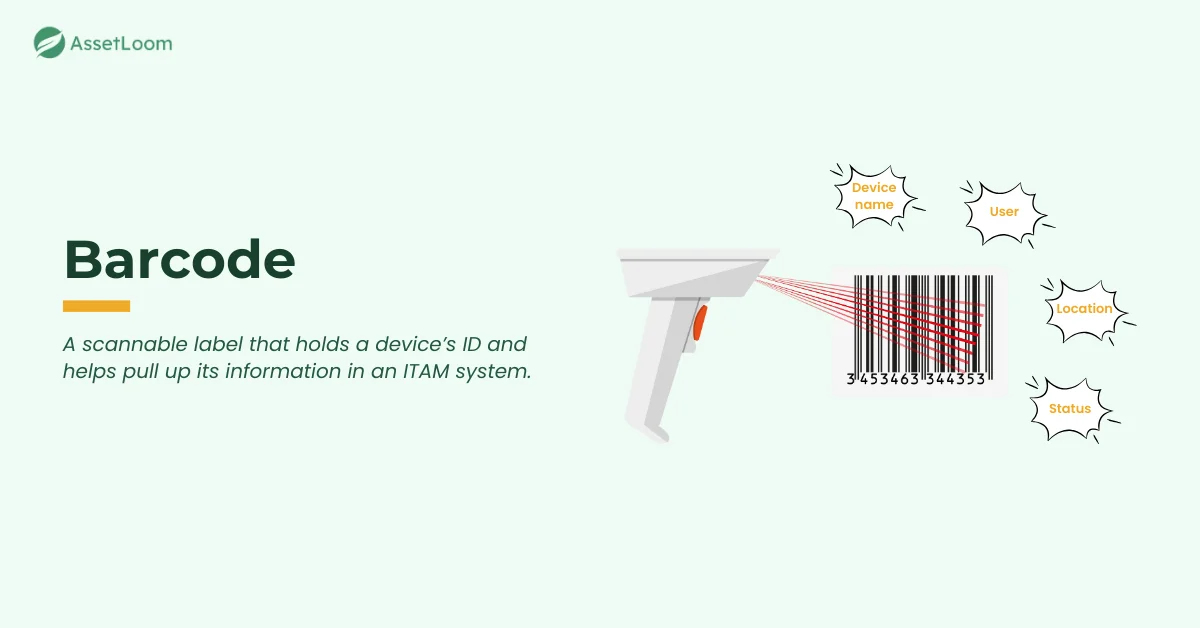
A barcode is a machine-readable label that stores small pieces of information about an item. In IT Asset Management (ITAM), a barcode usually holds an asset ID or a serial number that helps identify a device quickly. When you scan the barcode, it pulls up the matching asset record inside your ITAM system.
Barcodes give every device a unique identity. This helps IT teams track laptops, monitors, mobile devices, and other equipment through their entire lifecycle. It also cuts down on mistakes that often happen with manual data entry. A simple scan makes it easy to update or confirm the status of an asset at any time.
How Barcodes Work
Barcodes work by encoding information into a pattern that a scanner can read. When a scanner captures the pattern, it converts the image into digital data. That data is then matched to an asset record inside your ITAM system. The record might include details like the device name, condition, assigned user, purchase date, or location.
The scan itself is fast. A device reads the light reflected from the barcode and translates the pattern into a value. Your ITAM platform uses that value as a key that points to a single asset in the database. This link between the physical label and the digital record is what makes barcodes useful during audits, check-ins, check-outs, and daily tracking.
Once scanned, the system can update status changes right away. This reduces manual typing, lowers the risk of mistakes, and gives IT teams a more accurate picture of their asset inventory.
Types of Barcodes Used in ITAM
Barcodes come in several formats, and each one supports IT asset tracking in a different way. Some are designed for simple identification, while others can hold larger amounts of information or survive tougher environments. Knowing the differences helps IT teams choose the right label for auditing, tagging, and day-to-day tracking.
1D Barcodes
1D barcodes are the classic linear codes made of vertical lines. They are called 1D because the data is stored in one direction, from left to right. They are commonly used in ITAM because:
- They store a single value, usually an asset ID.
- They are cheap and easy to print.
- They work with almost every barcode scanner.
- They suit devices that only need a basic identifier, such as monitors, keyboards, and docking stations.
Their main limitation is data capacity. They cannot store long or complex values.
2D Barcodes (QR Codes)
2D barcodes use a grid of squares or patterns. They are called 2D because the data is stored in two directions, both horizontally and vertically, which allows them to hold more information in the same space.
In ITAM, they offer important benefits:
- They can store multiple data fields, such as serial numbers or model info.
- They can be scanned by mobile phones or camera-based scanners.
- They scan from more angles and tolerate minor damage.
- They let IT teams include richer asset details without needing a larger label.
QR codes work well for high-value devices, field equipment, and assets that require frequent scanning.
Durable and Tamper-Proof Labels
Durable labels are designed to stay readable even when exposed to heat, moisture, or heavy handling. These labels are not a different barcode format. They are simply stronger materials that protect the printed barcode. They matter in ITAM because:
- They remain scannable for years.
- They resist scratches and friction from daily use.
- They stick to textured surfaces like server chassis or rack equipment.
- Tamper-proof versions show clear marks if removed, which prevents asset swapping or unauthorized movement.
These labels are often used on laptops, tablets, servers, racks, and shared equipment that moves between users.
Why Barcodes Matter in IT Asset Management
Barcodes help IT teams keep asset records accurate and easy to manage. They create a clear link between the physical device and its digital record, which supports better tracking throughout the asset lifecycle.
Barcodes support ITAM in several important ways:
- Improve accuracy: Scanning removes typing mistakes and always pulls the correct asset record.
- Speed up audits and daily tracking: A quick scan confirms status, location, or assigned user, making audits and check-in or check-out tasks faster.
- Keep records up to date: Each scan updates the asset’s information right away, helping maintain clean and reliable inventory data.
- Support lifecycle planning: Regular scans reveal asset age, usage, and condition, which helps with repair or replacement decisions.
- Reduce operational effort: Barcodes work with low-cost scanners or mobile devices, keeping the workflow simple and efficient.
These advantages make barcodes a dependable and cost-effective choice for managing IT assets at scale.
Barcode vs Other Asset Identification Methods
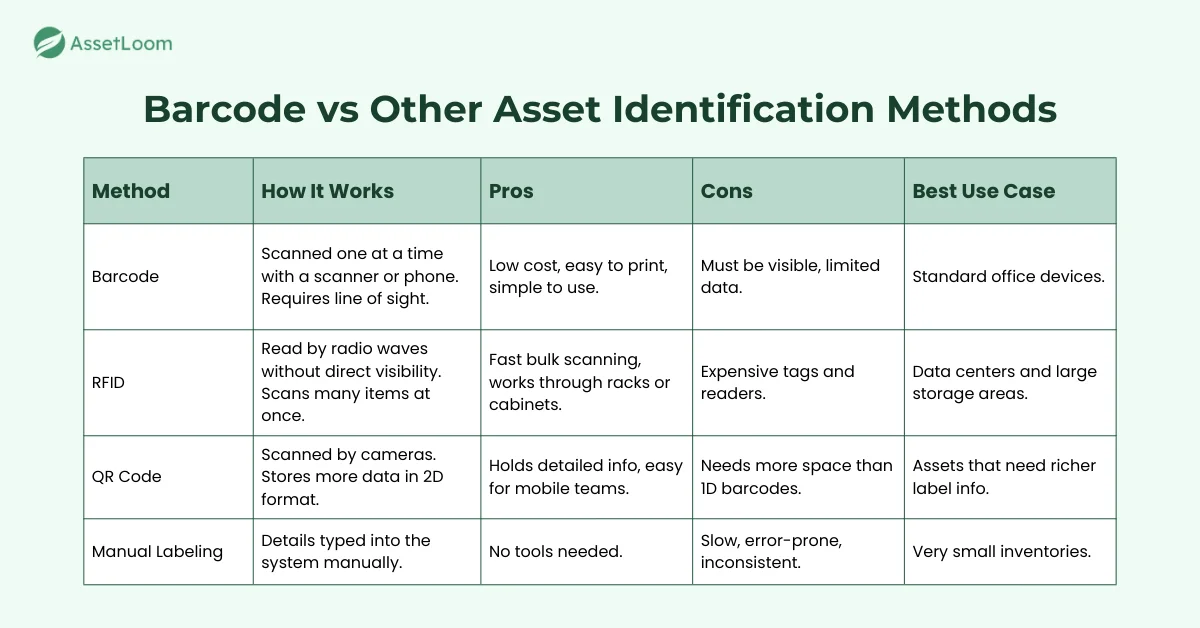
Barcodes are one of the most widely used identification tools in IT asset management, but they are not the only option. Different methods offer different levels of accuracy, speed, and cost. Understanding how barcodes compare helps IT teams choose the right approach for their workflows.
Barcode vs RFID
Barcodes require a direct line of sight and are scanned one at a time. This makes them ideal for office environments where IT staff check devices during audits, onboarding, or help desk work. They are inexpensive to produce and work with basic scanners or mobile apps.
RFID works through radio signals, so the tag does not need to be visible. Multiple items can be scanned at once, even inside cabinets or racks. This saves time in large storage rooms or data centers. However, RFID tags and readers are much more expensive, which may not fit all budgets.
In most office setups, barcodes offer the best balance of cost and efficiency. RFID is valuable when quick, bulk scanning outweighs the higher investment.
Barcode vs QR Code
Barcodes store a single identifier, usually an asset ID that links to the asset record in your ITAM system. They are fast to scan and easy to place on small devices.
QR codes store much more information and can include serial numbers, model details, support links, or direct URLs to asset pages. They scan well even at angles or from a distance, and they work with mobile device cameras, which makes them convenient for distributed teams.
Barcodes are ideal for simple identification. QR codes are better when you want the label itself to hold more context.
Barcode vs Manual Labeling
Manual labels rely on someone typing details such as serial numbers or usernames into the system. This takes more time and increases the risk of mistakes, especially during audits or check-ins.
Barcodes remove these errors by pulling the correct asset record instantly. They also speed up routine tasks like confirming asset location, updating assignments, or checking equipment in and out of storage.
Manual labeling can work for very small inventories, but once the number of devices grows, barcoding becomes a more sustainable and accurate approach.
Best Practices for Using Barcodes in ITAM
1. Use durable labels
IT assets face constant handling, movement, and temperature changes. Standard paper labels wear out quickly. Use polyester, laminated vinyl, or metal foil labels that resist scratches, heat, and moisture. Durable labels reduce reprints, keep barcodes scannable for years, and prevent interruptions during audits.
Action tip: Match label durability to asset type. Use laminated labels for laptops and rugged vinyl labels for servers or network switches.
2. Pick the right placement
A barcode must be easy to find and easy to scan. Place labels on flat, smooth surfaces that stay visible during normal use. Avoid areas covered by cases, monitor arms, docking stations, or accessories. Stay away from textured or curved surfaces that distort the code.
Action tip: Create a placement guide with example photos for common devices like laptops, monitors, printers, and mobile devices.
3. Follow consistent tagging standards
Define standards for label size, design, asset ID format, and placement. Apply the same rules across all devices. Consistency helps teams scan faster and reduces guesswork during audits or repairs.
Action tip: Add your tagging standards to your ITAM documentation and train new technicians during onboarding.
4. Tag assets during onboarding
Tag assets as soon as they arrive from the supplier. Early tagging prevents untracked devices from entering your environment and ensures complete records from day one. This helps maintain clean, accurate inventory.
Action tip: Add a barcode-tagging step to your receiving checklist so no device enters circulation without a label.
5. Train staff on scanning workflows
Barcodes only work well when scanning becomes a habit. Teach staff to scan during check-ins, check-outs, repairs, and transfers. Regular scanning keeps asset data accurate without extra admin work.
Action tip: Add required scan steps in your ticketing system for repair tickets, onboarding tasks, and device handovers.
6. Connect scanning to your ITAM system
Use scanners or mobile apps that sync directly with your ITAM platform. A scan should update the asset record instantly, eliminating manual typing and reducing the risk of data errors.
Action tip: Use a mobile scanning app for onsite audits so technicians can update records as they walk through offices, storage rooms, or data centers.
7. Replace damaged labels quickly
Labels can fade, peel, or scratch over time. When a label becomes hard to scan, replace it immediately. Keeping labels readable prevents missing scans during audits and avoids mismatched records.
Action tip: Add label condition checks to your quarterly audits and keep spare labels on hand to re-tag devices during inspections.
Glossary of Related Terms
- Asset Health
- Hardware Asset Management
- Mobile Device Management (MDM)
- Software Asset Management
- Total Cost of Ownership (TCO)
- Vendor Management
Frequently Asked Questions (FAQ)
What information can a barcode store?
A barcode usually stores a single identifier, such as an asset ID. This ID links to a full asset record in your ITAM system that contains details like model, serial number, user, and location.
Do I need special equipment to scan barcodes?
Not always. Basic 1D barcodes can be scanned with handheld barcode scanners or mobile apps that use a device camera. Many IT teams use smartphones or tablets for quick scanning during audits.
Can barcodes be used for software assets?
Barcodes are mainly used for physical hardware. Software assets are tracked through license keys, installation records, or discovery tools instead of physical labels.
How long do barcode labels last?
Durable labels can last several years, especially when made from laminated or vinyl materials. Their lifespan depends on placement, handling, and environmental conditions.
Are QR codes better than traditional barcodes for ITAM?
QR codes store more information and can be scanned with mobile devices, which makes them useful for detailed tracking. Traditional barcodes remain a good choice when you only need a simple identifier and fast scanning.