Best Inventory Management Software: Essential Features to Look for
Discover the essential features of the best inventory management software for 2025: real-time tracking, multi-channel integration, etc.
Inventory management software helps businesses keep control of their stock, avoid shortages, and maintain smooth day-to-day activities. Choosing the right system can shape how well your business handles orders, tracks products, and responds to changes in demand.
With so many tools available, it’s important to understand which features truly matter. Knowing these essentials helps you compare options and choose software that fits the way your business works.
In this article, we’ll explore the key features that set the best inventory management software apart, and why they’re important for your business.
Why Inventory Management Software Is Important
Good inventory management helps businesses keep the right amount of stock, avoid delays, and reduce unnecessary costs. When companies rely on manual methods like spreadsheets, it becomes harder to stay accurate. These methods take time and are more likely to lead to mistakes, such as running out of products or ordering more than needed.
Research shows that poor inventory practices cost businesses billions each year. Stock inaccuracies, unexpected shortages, and unused inventory all contribute to these losses.
Inventory management software solves these problems by automating tracking and giving teams real-time information. With accurate data, businesses can make better decisions, prevent costly errors, and respond quickly to changes in demand.
Understanding the IT asset inventory management key features of these tools helps companies choose software that fits their workflows and supports long-term growth.
_Related article: What is Inventory Management? Definition, Scopes, Methods
Key Features of the Best Inventory Management Software
The best inventory management software offers a range of tools to help businesses stay in control of their stock. Below are the most important features to look for when comparing solutions.
1. Real-Time Inventory Tracking
Real-time tracking lets businesses see their stock levels the moment they change. The system updates automatically whenever items are sold, returned, or restocked. This helps prevent overselling, stockouts, and inaccurate counts.
For companies with multiple warehouses or sales channels, real-time visibility is essential. It ensures all teams work with the same data, especially in fast-moving environments.
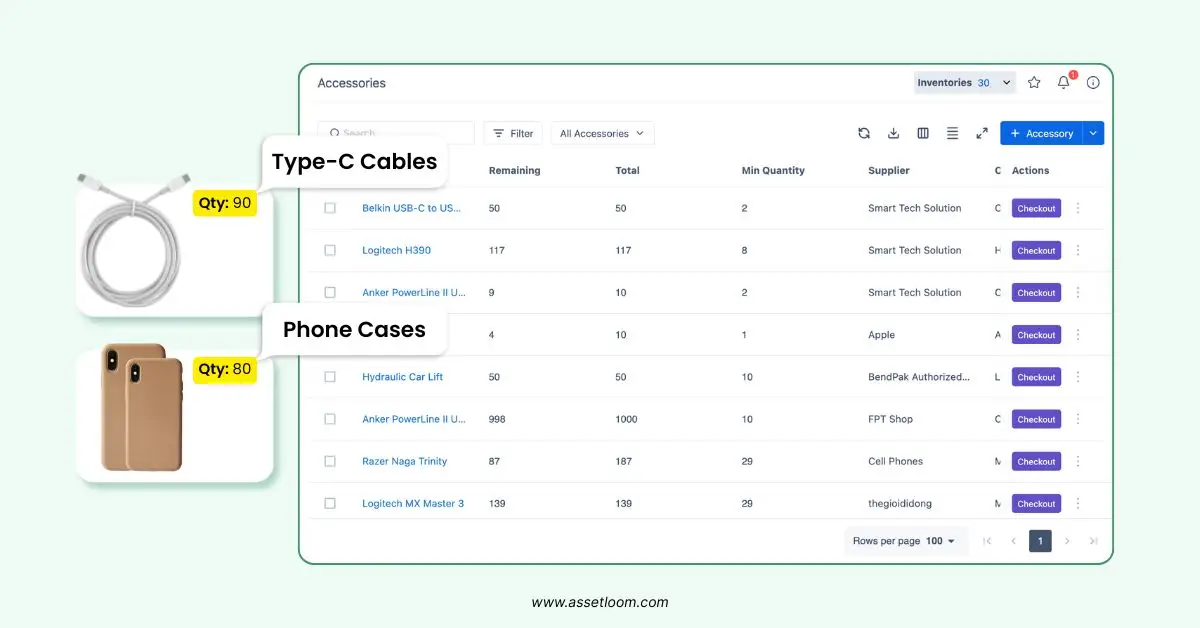
AssetLoom monitors stock levels, which makes it one of the best inventory management software
2. Multi-Channel Integration
If you sell through several channels, like online stores, marketplaces, or physical locations, you need software that syncs everything together. The best systems integrate with platforms such as Shopify, WooCommerce, Amazon, and eBay.
When a product is sold on one channel, the software updates the stock across all channels automatically. This reduces manual work, prevents mismatched data, and helps businesses avoid overselling.
3. Order Management
Strong order management tools make the entire order process easier—from the moment a customer places an order to the moment it is shipped.
Useful features include:
- Creating and managing sales orders
- Generating invoices
- Tracking shipments
- Bulk order processing
- Automatic shipping label creation
For manufacturers, these tools can also connect inventory with production schedules. This ensures materials are available when needed without creating excess stock.
4. Warehouse Management
Businesses with multiple storage locations need strong warehouse management tools. These features help track stock across different warehouses, manage transfers, and support barcode scanning for faster updates.
A good warehouse management system helps teams:
- Locate items quickly
- Use storage space more efficiently
- Speed up picking and packing
- Reduce errors during stock movement
This is especially valuable for wholesalers, distributors, and retailers with complex logistics.
5. Reporting and Analytics
Reporting and analytics give businesses a clear view of how their inventory is performing. The best systems generate reports on:
- Stock levels
- Slow-moving items
- High-demand products
- Sales trends
- Inventory turnover
These insights help businesses adjust purchasing plans, avoid overstocking, and focus on products that generate profit. Customizable reports also let teams track the metrics that matter most to them.
6. Automated Reordering
Automated reordering helps businesses keep the right amount of stock at all times. By setting reorder points, the system automatically creates a purchase order when quantities drop too low.
This feature helps:
- Prevent stockouts
- Reduce manual work
- Keep fast-moving inventory available
- Improve supplier communication and timing
For busy operations, automated reordering ensures smooth, uninterrupted restocking.
7. Barcode, QR Code Scanning and Mobile Access
Barcode scanning makes inventory tasks faster and more accurate. Staff can update stock levels with just a quick scan, reducing mistakes and saving time during inventory counts.
Mobile access adds flexibility. Employees can check stock, scan barcodes, and manage inventory from anywhere, inside a warehouse, at a retail store, or across multiple locations. This is especially useful for businesses with distributed teams or frequent stock movement.
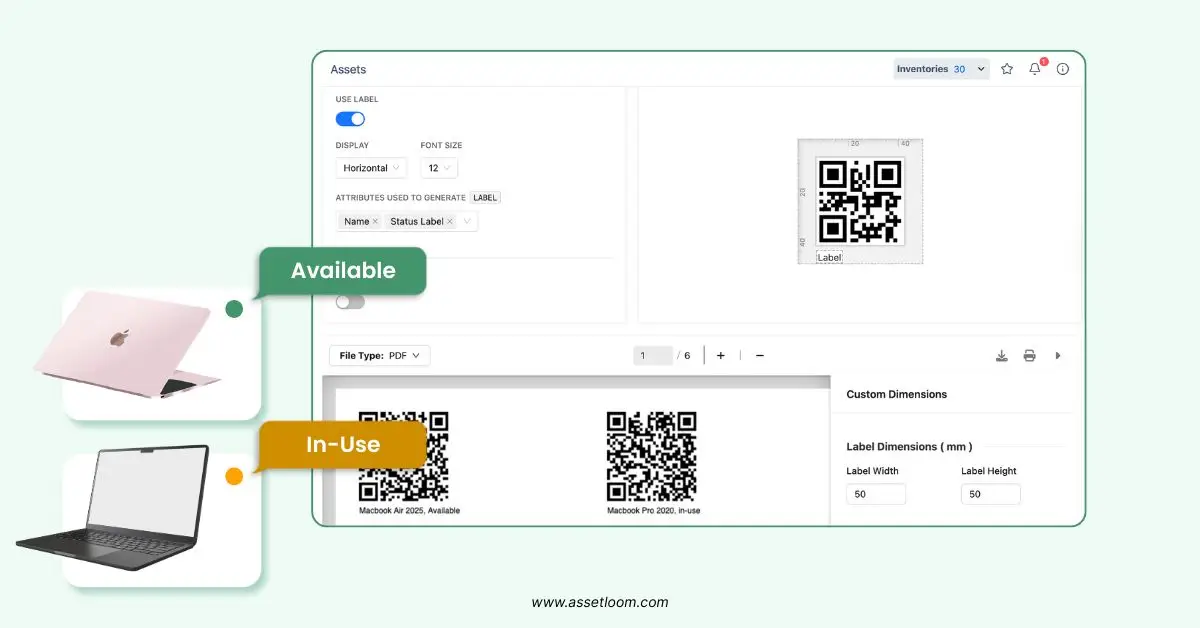
AssetLoom allows generating QR codes from the unique asset tags
Related article: QR, Barcode, or RFID: What’s the Best Fix for IT Inventory Tracking?
8. Demand Forecasting
Demand forecasting uses past sales data to predict what inventory you’ll need in the future. This helps businesses avoid overstocking or running out of popular items.
Forecasting tools analyze:
- Sales trends
- Seasonal patterns
- Customer buying behavior
These insights support better purchasing and production planning. For businesses with changing demand, like seasonal retailers or manufacturers, forecasting ensures stock levels match market needs, reducing waste and improving planning.
9. Scalability and Customization
As a business grows, its inventory needs grow too. The best inventory management software scales easily by supporting:
- More users
- Additional warehouses
- Extra sales channels
- Larger product catalogs
Customization options also help teams adjust the system to fit their workflows. This may include adding custom fields, changing dashboards, or configuring role-based access.
Scalability keeps the software useful as the business expands, and customization helps meet industry-specific needs, such as manufacturing steps or retail pricing rules.
10. User-Friendly Interface
A simple, easy-to-use interface is essential. It helps employees learn the system faster and reduces mistakes during daily tasks. The best tools include:
- Clear navigation
- Clean dashboards
- Easy access to common features
This matters most for small businesses or teams with limited technical experience. When the software is easy to use, staff can focus on actual inventory work instead of struggling with complicated menus or confusing workflows.
How to Choose the Best Inventory Management Software
Choosing the right inventory management software starts with understanding what your business needs and how you operate. Here are the key steps to guide your decision:
1. Identify Your Business Requirements
Start by listing the features that matter most to your workflow.
- E-commerce businesses may need multi-channel integration.
- Logistics-heavy companies may need advanced warehouse management.
- Retailers may prioritize real-time tracking and POS integration.
Knowing your priorities helps narrow down your options quickly.
2. Set Your Budget
Look for pricing that fits your business size.
- Small businesses may benefit from free plans or lower-tier options.
- Larger organizations may need premium features with higher limits.
Choose software that offers value, not just the lowest price.
3. Check Integration Capabilities
Your inventory software should work smoothly with the tools you already use, such as:
- E-commerce platforms
- Accounting tools
- ERP systems
- POS systems
Good integrations reduce manual work and keep data consistent across your business.
4. Test Ease of Use
A user-friendly interface is essential. It reduces training time and helps teams adopt the system faster. Use free trials or demos to evaluate:
- Navigation
- Dashboard layout
- How quickly you can complete common tasks
If the software feels complicated during testing, it will feel even harder during daily use.
5. Consider Scalability
Choose software that can grow with your business. Look for systems that support:
- Additional users
- More warehouses
- Higher order volumes
- Extra sales channels
Scalable software saves you from switching tools later.
6. Review Support and Service Options
Reliable customer support is a must. Look for providers offering:
- Live chat
- Email support
- Phone assistance
- Knowledge bases or video tutorials
Good support helps you resolve issues quickly and avoid disruptions.
Additional Best Inventory Management Software Considerations for 2025
As businesses adapt to new challenges in 2025, several trends are influencing how inventory management software is built and used.
- Cloud-based solutions are becoming the standard. They offer easy access from anywhere, automatic updates, and no need for on-premises servers.
- Mobile apps are now expected features. They allow teams to update stock, scan items, and manage inventory directly from a phone or tablet.
- Sustainability tools are gaining traction. Some systems now include features for tracking waste, reducing excess inventory, and supporting eco-friendly operations.
When evaluating software, keep these trends in mind to choose a solution that stays relevant and supports your long-term goals.
Conclusion
The best inventory management software in 2025 combines essential features like real-time tracking, multi-channel integration, strong order management, and detailed reporting. Tools such as automated reordering, barcode scanning, and demand forecasting add even more value.
Scalability and an easy-to-use interface make these systems accessible for businesses of any size. By focusing on the features that match your needs, you can find software that improves accuracy, reduces costs, and supports growth.
Free trials and demos are a great way to test a system before committing. The right solution will help you manage your inventory more confidently and stay competitive in a fast-changing market.