What is a Consumption Report in IT Asset Operations
A consumption report gives IT leaders a clear view of what is working, what is underused, and what is costing more than it should.
What is a Consumption Report?
A consumption report provides a detailed view of the actual usage of IT assets within the IT ecosystem, in the context of IT asset management (ITAM). The consumption report gathers data from hardware, software, cloud platforms, and user activity. It highlights how resources behave in real conditions, not in vendor promises or budget plans.
This report becomes a mirror for the IT environment. It reflects the true state of usage and performance. It helps IT leaders shift from reacting to issues to planning ahead with clarity.
Key Components of an IT Asset Consumption Report
A good consumption report does more than list numbers. It gives IT leaders the information they need to make smart choices. Each component plays a role in helping teams understand how assets behave, how much they cost, and how they support the business. When these pieces come together, the report becomes a guide for action, not just a document.
1. Asset Details and Inventory
Every strong report begins with clear asset information. This gives context to the usage data that follows. It helps IT teams link behavior to the right device or service.
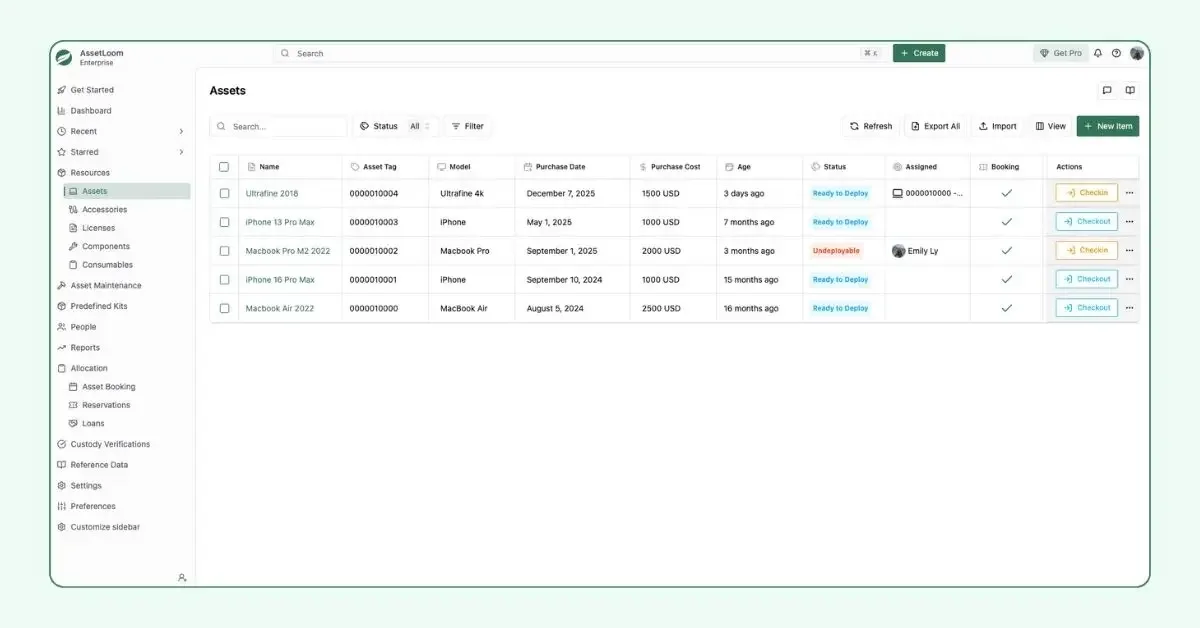
Asset List in AssetLoom
A complete view includes:
- Identification information such as serial numbers, manufacturer, model, and asset type.
- Status and location so teams know where the asset sits and who is using it.
- Lifecycle dates such as purchase, deployment, warranty, and support periods.
This foundation matters because you cannot optimize what you cannot identify. Many IT problems begin with poor asset records. A detailed inventory solves that.
2. Usage and Utilization Metrics
This is the heart of any consumption report. It shows how assets are being used in real life, not in theory. When you track usage, you uncover waste, gaps, and opportunities.
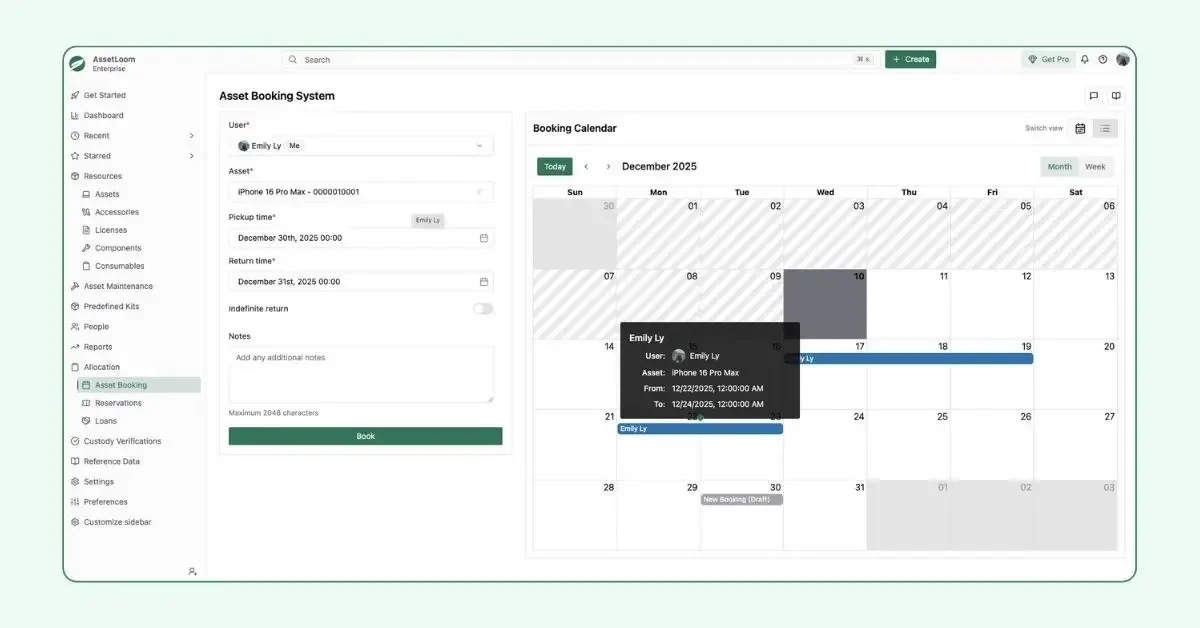
Asset Booking System in AssetLoom
Useful data includes:
- Utilization rates that show frequency, duration, and peak usage times.
- User activity that reveals how people interact with systems.
- Cloud consumption metrics for storage, compute power, and bandwidth.
These insights help managers understand which assets deliver value and which ones drain resources. They also reveal patterns that guide scaling decisions and resource planning.
3. Financial Data
Cost visibility is central to smart IT operations. A consumption report connects usage to spending, which helps leaders argue for a budget or find savings.
Important financial elements include:
- Cost analysis that covers procurement, maintenance, and depreciation.
- Total cost of ownership (TCO), which shows the full impact of an asset over its life.
- Cost-saving opportunities, such as redeployment, consolidation, or refresh cycles.
When IT managers see both usage and cost together, they can shift spending toward what truly matters.
4. License and Compliance Information
Software assets bring their own risks. A good report highlights the health of licenses and compliance, so the team avoids penalties and security issues.
This section typically includes:
- License status that shows active, inactive, or soon-to-expire licenses.
- Compliance and security notes, such as patch status, access control, and regulatory requirements.
This information protects the business. It helps managers stay ahead of renewals, avoid overbuying, and prove compliance with confidence.
What Do We Get From a Consumption Report
Modern IT environments are busy, distributed, and full of moving parts. The consumption report gives structure to this complexity. It brings together usage data, financial details, and compliance information in one place. With it, IT leaders do not have to guess how their environment behaves. They can see it clearly and act with intention.
Turning Data into Decisions
A strong consumption report begins with accurate asset details. This baseline allows teams to connect usage to the right device, user, or department. When an IT manager knows exactly where an asset sits, who relies on it, and how far along it is in its lifecycle, they can plan repairs, schedule replacements, or retire aging equipment with confidence. This clarity prevents waste and reduces disruption.
Example
Let’s take this as an example. Maria from Finance has been assigned a laptop that overheats frequently and produces excessive fan noise. When the IT team pulls up the asset detail record, they see a clear picture: the device is 4.5 years old, out of warranty, and has been assigned to a business-critical role for several years. With this information, the team can make a proactive decision. They schedule an early replacement and prepare Maria’s data migration before the device fails during a tight Finance deadline.
| Asset ID | Type | Assigned To | Location | Status | Purchase Date | Warranty End | Support Tickets |
|---|---|---|---|---|---|---|---|
| LAP-1124 | Laptop | Maria (Finance) | HQ 3rd Floor | Active | 2019-08-12 | 2022-08-12 | Fan noise (3) |
This is how raw inventory data becomes a real decision. It allows IT teams to stay ahead of issues instead of reacting to unexpected outages.
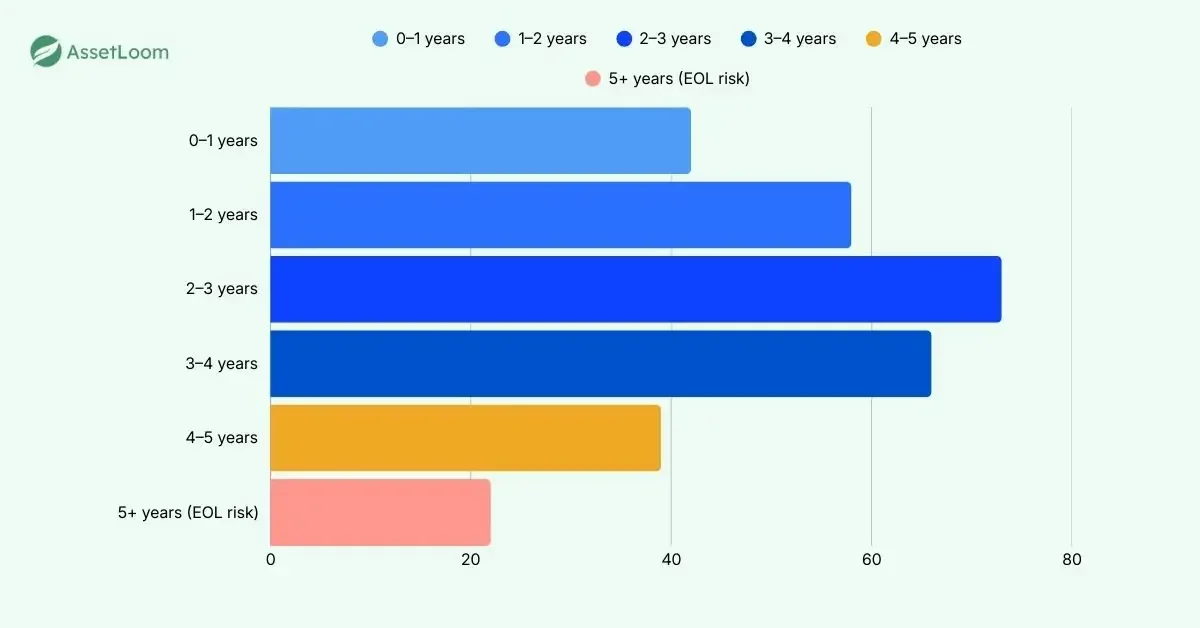
Example of an EOL report
In some IT AssetOps platforms, the data goes even further. They can automatically group asset ages, forming a simple chart that shows how many devices have already reached end of life and how many will reach it soon. This gives IT managers a fast way to understand lifecycle risk at a glance. With that insight, they can plan procurement, budget for replacements, and act promptly before aging devices slow the business down.
Finding Value and Waste Through Utilization Patterns
Usage patterns can come from assignment history, reservation logs, and allocation patterns across the organization. These signals reveal which assets are in high demand and which ones consistently go unused. Over time, these patterns show where the business should invest and where it should stop spending.
Example
A well structured consumption report might show that MacBook models are frequently reassigned between departments, consistently requested by new hires, and often reserved in advance, while Dell laptop models sit unassigned for long periods with zero reservation or check-out activity.
Raw Data From the Consumption Report
| Model | Total Units | Assigned Units | Unassigned Units | Requests This Quarter | Reassignments |
|---|---|---|---|---|---|
| MacBook Pro 14” | 42 | 40 | 2 | 18 | 11 |
| Dell Latitude 5420 | 30 | 12 | 18 | 0 | 2 |
From this simple dataset, several insights emerge:
- MacBooks show consistent demand, high turnover, and multiple inter-department requests.
- Dell laptops show low adoption, long idle periods, and no reservation activity.
- New hire workflows and department preferences clearly lean toward MacBooks.
Based on this pattern, the IT manager can:
- Stop purchasing Dell laptops, since they are not being requested.
- Allocate future hardware budget toward MacBook models, which better match employee needs.
- Redeploy unused Dell units to temporary staff, contractors, or low-priority roles to avoid waste.
- Prepare replacement plans for MacBooks since high usage tends to correlate with higher wear and shorter lifecycle.
This is how an ITAM-driven consumption report helps teams optimize spending without tracking personal activity data.
Making Budget Conversations
Financial data turns the report into a strategic budgeting tool. When IT managers can match usage with cost, they can explain spending in a way that business leaders understand. Cost of ownership, maintenance expenses, and depreciation reveal which assets deliver value and which ones drain resources
For example, from the report below,
| Asset ID | Purchase Cost | Maintenance YTD | Depreciation (2025) | Estimated TCO |
|---|---|---|---|---|
| LAP-1124 | $1,200 | $80 | $240 | $1,520 |
| LAP-2049 | $1,350 | $0 | $270 | $1,620 |
| SRV-3301 | $7,800 | $540 | $1,560 | $9,900 |
IT teams can come up with some insights, such as:
- LAP-1124 shows rising maintenance costs and aging hardware → replacement recommended.
- LAP-2049 shows zero maintenance spend but no utilization → redeployment recommended.
Managing Risk With Clear License and Compliance Data
Software assets bring compliance and security responsibilities. The consumption report shows which licenses are active, which are unused, and which are close to renewal. Patch status and access controls reveal potential risks that need attention. With this information, IT teams can avoid penalties, close security gaps, and prepare for audits without last-minute scrambling.
Using Consumption Insights to Shape Long-term Strategy
A consumption report does not create forecasts for the team. Instead, it provides the behavioral data that allows managers to predict future needs. Rising usage in one department may signal the need for more capacity next quarter. A drop in activity for a certain tool may indicate that a system is ready to be retired or consolidated.
The report delivers evidence. Skilled IT leaders turn that evidence into strategic direction.
Tips for IT Managers When Reading a Consumption Report
Even a strong report can be overlooked if the reader does not know where to focus. Here are practical tips that help IT managers extract real value:
1. Look for extremes first
Identify assets with very high or very low usage. These outliers often reveal hidden bottlenecks or wasted budget.
2. Compare usage trends with business activity
If a team is growing but their usage is flat, there may be adoption issues. If usage spikes without explanation, a hidden operational risk may be forming.
3. Check license alignment monthly
Inactive licenses often appear over time. A quick monthly review helps avoid unnecessary renewals and keeps compliance clean.
4. Map total cost of ownership to utilization
A costly asset with low usage is a prime candidate for redeployment or retirement. High usage with high cost might signal the need for planned upgrades.
5. Watch for aging assets that still carry heavy workloads
These devices may fail without warning. Early insights allow teams to prepare backup plans and replacements.
6. Use the report to challenge assumptions
If a department believes they need new hardware, check their actual usage first. Data-driven conversations build trust and avoid emotional decisions.
To Sum Up
An IT asset consumption report gives IT leaders the clarity they need in an environment that grows more complex every year. It brings together asset details, usage patterns, cost data, and compliance information in one understandable view. With this foundation, IT teams can make confident decisions that reduce waste, prevent downtime, and protect the business from unexpected risks.
Frequently Asked Questions (FAQs) about Consumption Reports
Q1. What is an IT asset consumption report?
An IT asset consumption report shows how hardware, software, cloud services, and other IT resources are actually used over time. It highlights utilization patterns, lifecycle status, cost impact, and compliance health. IT managers use it to understand asset behavior, spot inefficiencies, and make informed decisions about future investments.
Q2. Why is a consumption report important in IT asset management?
The report removes guesswork from IT operations. It helps teams identify underused assets, detect high-risk aging devices, avoid unnecessary purchases, and prepare for renewals or replacements. It is one of the fastest ways to optimize budget and improve system reliability.
Q3. What should an IT asset consumption report include?
A strong report includes asset details, usage and allocation patterns, financial data, license status, lifecycle dates, and compliance indicators. These components give IT managers a clear view of how each asset supports the business and where improvements can be made.
Q4. How often should IT teams review consumption reports?
Most organizations review consumption reports monthly or quarterly. Monthly reviews help IT teams stay ahead of expiring licenses, growing cloud costs, aging hardware, and shifting usage patterns. Quarterly reviews are useful for budgeting, forecasting, and adjusting long-term asset strategies.
Q5. How does a consumption report help reduce IT spending?
The report shows which assets are over-purchased, underused, or approaching end of life. With this data, IT teams can redeploy idle devices, eliminate unnecessary licenses, right-size cloud resources, and plan replacements before breakdowns occur. These actions directly reduce waste and protect the budget.