What is Custody Verification? Verify IT Asset Custody in 3 Simple Steps
Custody verification is the process of confirming that an IT asset is still with the assigned person and checking its current condition
What is Custody Verification in ITAM?
Custody verification is the process of checking that an IT asset, such as a computer, phone, or server, is still with the person it was assigned to. It also looks at the asset’s condition to spot problems like damage or loss early.
Unlike ownership verification, which proves legal rights through purchase documents or serial number matches, custody focuses on day-to-day possession.
For example:
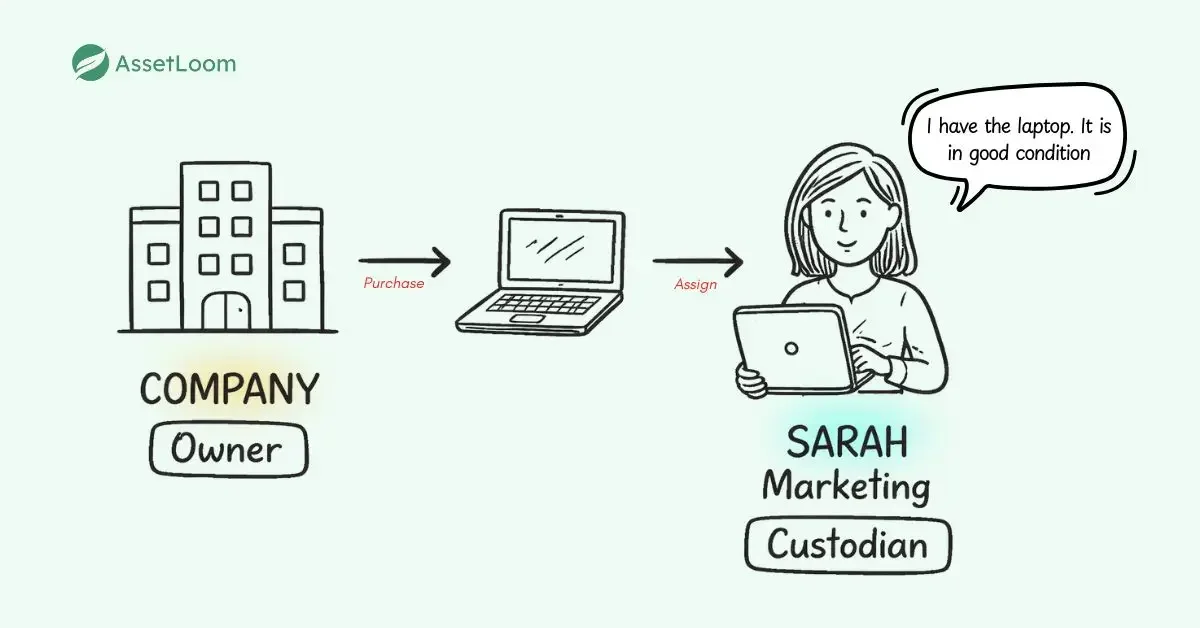
- A company might own a laptop (the owner), but an employee is assigned to use it (the custodian).
- The employee is responsible for keeping the laptop safe, maintaining it, and using it appropriately.
The Difference Between Asset Custody and Asset Ownership
Imagine your company owns hundreds of laptops, phones, and monitors. You have receipts and records proving every item belongs to the business; that’s ownership. But who actually has each device right now? Is it in good condition, or has it been damaged or lost? That’s the part of custody.
Asset ownership focuses on legal and financial proof. The company owns the asset. Records show purchase date, cost, serial number, and depreciation. These details matter for accounting, taxes, and audits.
Custody focuses on operational control. It’s about answering the “care” questions like, “Who uses the asset daily?”, “Is it at the office, home, or another site?”, “Is it still working well, or is it damaged due to personal use?”. While ownership rarely changes unless the asset is sold or disposed of, custody can change often. For example, when an employee leaves, custody transfers back to the company or to a new user.
Why Verify Custody?
When you skip regular custody checks, small problems turn into big ones. A forgotten laptop in an ex-employee’s home can sit there for months. A stolen phone might go unreported because no one asked. Damage might go unnoticed until the device fails completely. Regular checks help in practical ways:
- You spot missing or damaged items early.
- You reduce security risks from lost devices holding sensitive data.
- You keep inventory records accurate for budgeting and planning.
- You meet compliance requirements for audits and data protection rules.
- You encourage people to take better care of assigned equipment.
- You save money by repairing instead of replacing.
In short, custody verification keeps your IT assets under control without needing constant physical inspections.
Learn More: Verifying IT Asset Custody: What Every Business Needs to Know
The General Process: How Custody Verification Works
At its core, the custody verification process is simple and follows the same basic steps whether you do it manually or with software.
1. Maintain a central list of assets and assignees
You should first prepare a complete list of all IT assets. For each item, record key details: the asset name or type, serial number, internal asset tag (if you use one), the person currently assigned to it, location, purchase date, and the date of the last verification. Adding physical labels such as QR codes or barcodes to each device makes future identification quicker and less error-prone.
Free Download - Asset List Template
Just as important is proper assignment. When an asset is given to someone, clearly record that person as the custodian - the individual responsible for its day-to-day care and use. This custodian is the one who will later confirm they still have the item. Clear assignment at this stage prevents confusion later and ensures requests go to the right person.
2. Send a clear request
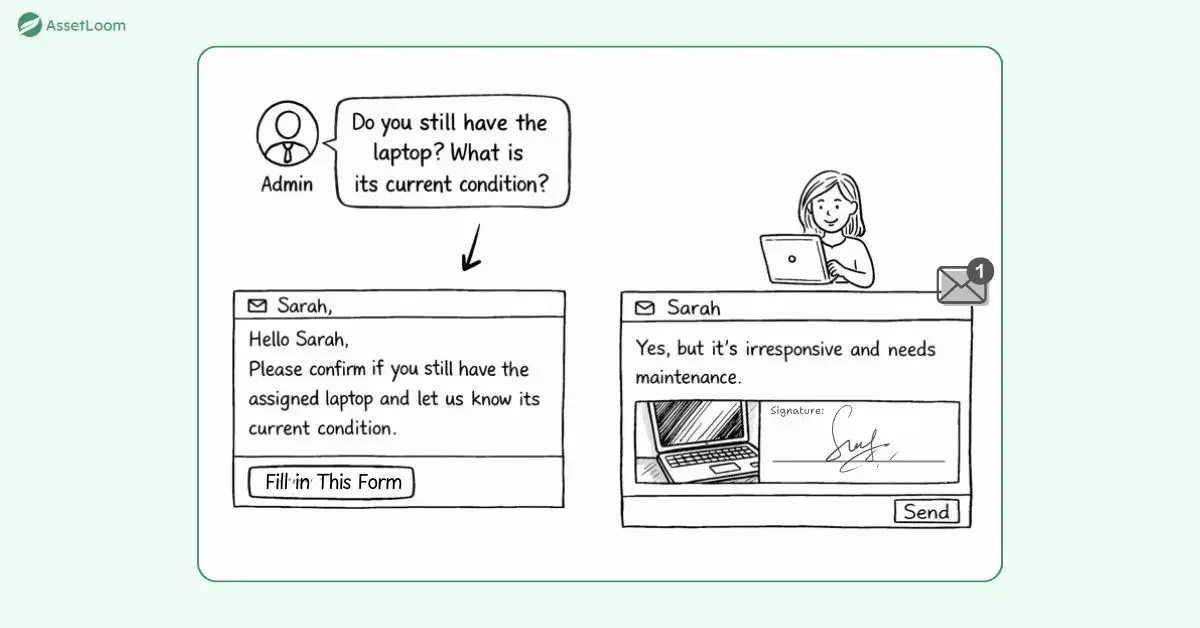
Notify the custodian through email, a portal message, or an app alert. Keep the message short and direct: list the asset details, ask them to confirm possession, and request the current condition. Include a simple way to reply, such as a link to a form.
3. Make responding easy
Provide straightforward options for the reply: “Yes, I have it – good condition,” “Yes, but damaged/needs repair,” “No – lost, stolen, or transferred,” and space for extra notes or even a photo if helpful. A digital signature or simple acknowledgment adds accountability.
4. Collect and review responses
Track who has replied and who hasn’t. Review answers quickly to spot issues, missing items, reported damage, or transfers that weren’t recorded.
5. Update records
Once a response comes in, update the asset record with the new status, condition, verification date, and any notes. This keeps your central list current.
Common Challenges with Custody Checks
When done manually with spreadsheets and emails, the custody verification process works for small teams but becomes time-consuming as the number of assets grows. Even with the best intentions, it can run into:
- Employees ignore email requests because they’re busy.
- Some people respond quickly but inaccurately.
- Manual tracking with spreadsheets and emails takes hours of admin time.
- Remote teams make visual checks impossible.
- Large organizations have thousands of items to track.
The good news is that clear communication and the right IT asset management (ITAM) approach solve most of these issues.
Verifying IT Asset Custody in AssetLoom
AssetLoom is an IT asset operations platform designed to keep all of your IT assets, from hardware to software, in one place. Its custody verification feature turns a potentially tedious task into a smooth routine. Here’s exactly how it works:
1. Send out Custody Verification Request
Every asset has its own central record in AssetLoom. From the asset list, you can see key details like name, serial number, assigned user, location, condition history, and current verification status.
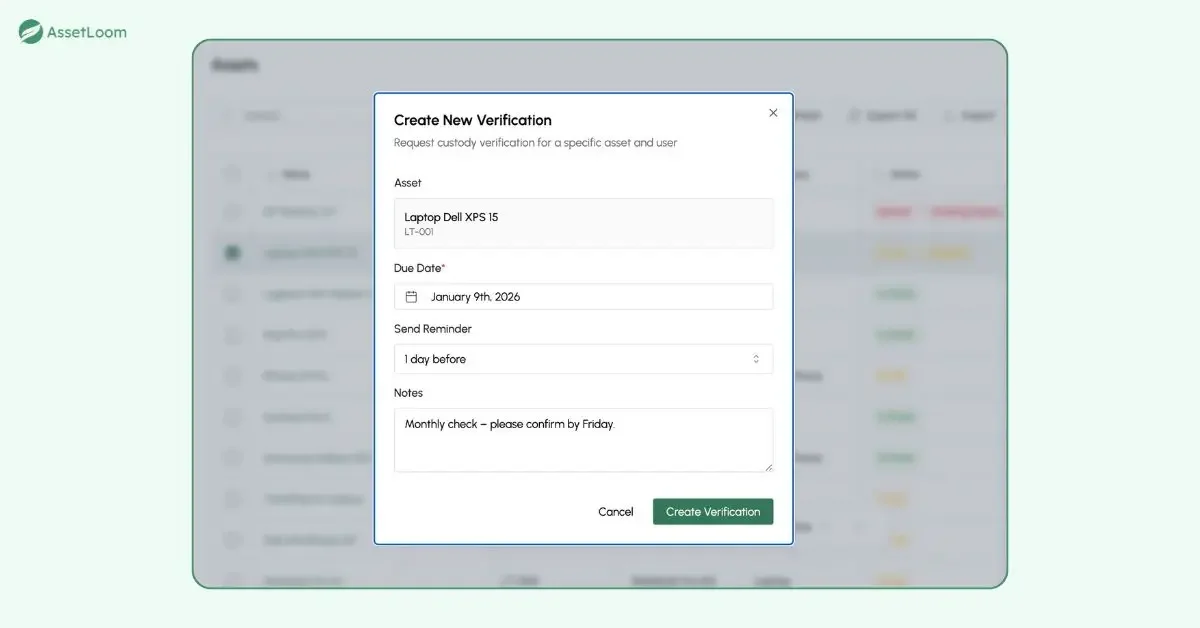
When you’re ready to start a check, simply select one asset or hundreds at once for a bulk verification. Set a due date and the reminder threshold to make sure that your teammate would not miss this request. If you like, add a short note, something like “Monthly check – please confirm by Friday.” AssetLoom automatically sends a personalized email to each assigned person. The email includes a direct link that takes them straight to the response page.
2. Receive The Custody Verification Request
The custodian receives the email, clicks the link, and logs in if required. They immediately see the exact details of the asset assigned to them.
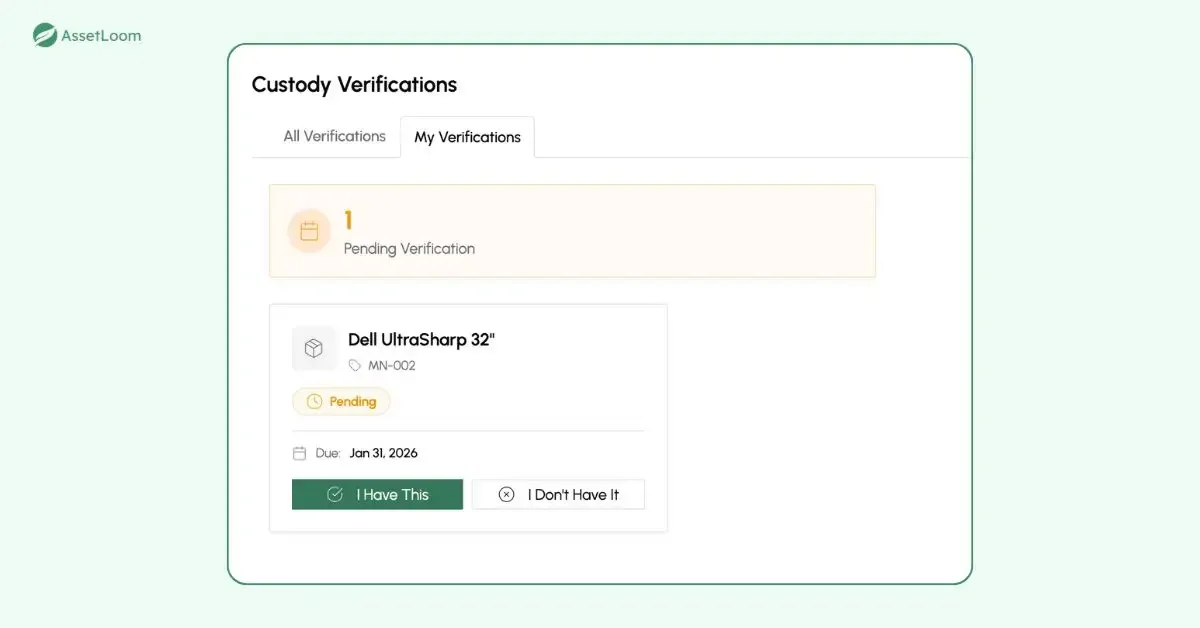
They answer two straightforward questions: Do they still have the asset? What is its current condition? They pick from clear options such as good, needs repair, damaged, lost, or stolen. They can add comments if something needs explaining. Finally, they apply a digital signature to confirm their response. The whole reply process should take less than a minute.
3. Collect & Report
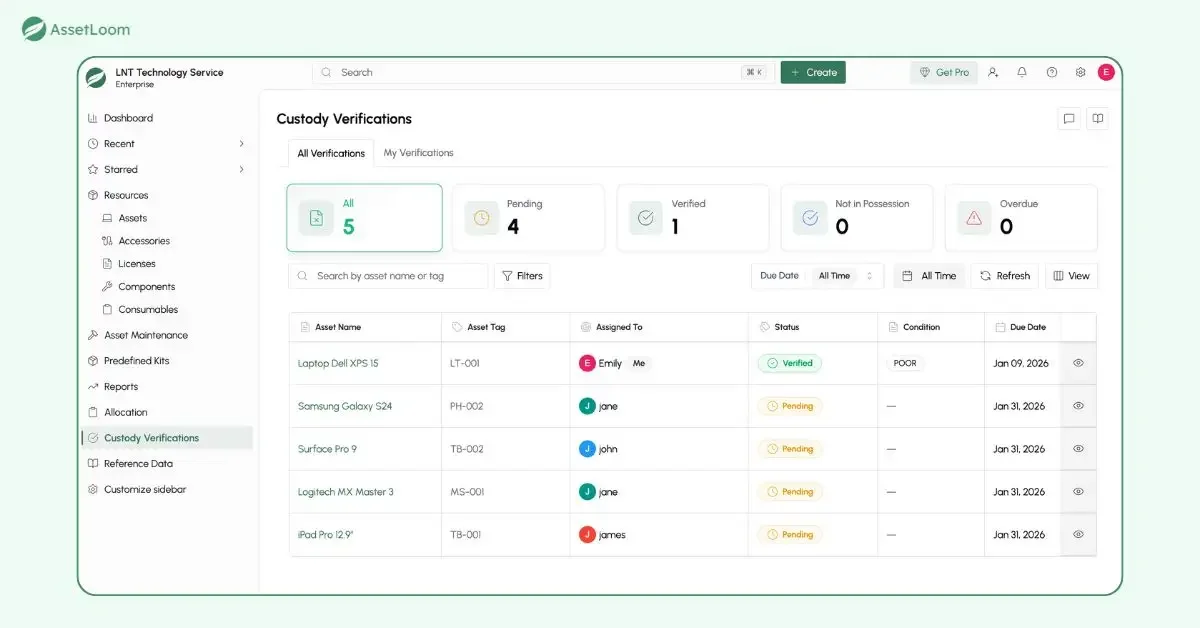
On the admin side, a dedicated verification dashboard shows real-time progress. You can see how many requests are completed, pending, or overdue. A complete history logs every past verification, who responded, and what they said.
Put it All Together
Custody verification ensures that assets are properly tracked, secured, and cared for by the right people at all times. With the help of IT asset management software like AssetLoom, the process becomes easy to handle, automated, and time-saving.
Frequently Asked Questions (FAQs) About Custody Verification
Q1: What is IT asset custody verification?
Custody verification ensures that the right person (custodian) is responsible for an IT asset and that it’s in the correct condition. This process tracks who is physically holding an asset and its condition over time.
Q2: What is the difference between custody verification and ownership verification in IT asset management?
Ownership proves the company legally owns the asset through purchase records. Custody verification checks who currently has physical possession and whether the asset is in good condition.
Q3: What are the basic steps in the general custody verification process?
Maintain a central asset list, decide what to check, send requests to custodians, collect responses, review and update records, follow up on issues, and repeat regularly.
Q4: Can custody verification be done manually, or do I need software?
It can be done manually with spreadsheets and emails for small teams, but IT asset management software like AssetLoom makes it faster, automated, and less error-prone, especially for larger organizations.
Q5: What happens if an employee reports that an asset is lost or damaged during verification?
The system or admin flags the issue immediately. This triggers follow-up actions such as recovery, repair, replacement, or insurance claims.